One repo, many Claudes: git worktrees with Claude Code
How I run several Claude Code sessions on one repo, each on its own branch, with git worktrees: plain git, the built-in --worktree flag, and what bites.
Mushfikunnabi Nijhum · · 11 min read
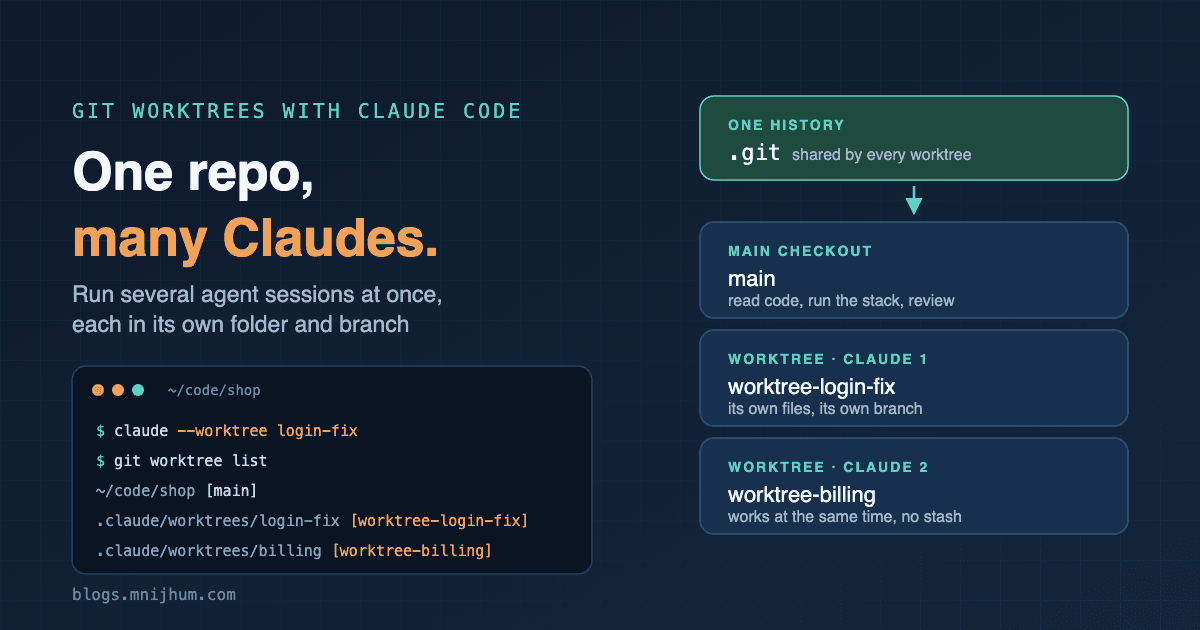
At work I was on a branch, in the middle of implementing a feature, with Claude Code working through it with me. Half the files were changed and nothing was ready to commit. Then an urgent fix came in. It could not wait for the feature, and I could not simply switch branches: my working directory was full of unfinished work.
The usual answers are all a little painful. Stash everything, switch, fix, switch back and hope the stash applies cleanly. Or make a "work in progress" commit you have to undo later. Or clone the repository a second time. And the Claude session that knew the feature loses its place either way.
That is the real limit when you work with a coding agent. The agent is fast, but a working directory can only be in one state: one checkout, one branch at a time, for you and for Claude.
Git worktrees remove that limit. This post shows how they work, how I use them with Claude Code, and what goes wrong when you forget they are separate folders.
What a worktree is
A worktree is a second working directory for the same repository. It has its own
files and its own checked-out branch, but it shares the one .git history with your
main checkout. It is not a clone: there is nothing to push or pull between them.
$ git worktree add ../shop-login-fix -b fix/login
Preparing worktree (new branch 'fix/login')
HEAD is now at 9315ca5 init

$ git worktree list
~/code/shop            9315ca5 [main]
~/code/shop-login-fix  9315ca5 [fix/login]
Two folders, two branches, one repository. A commit made in either folder is visible
from the other at once, because both write to the same history. Inside the new folder,
.git is not a directory but a one-line file that points back home:
gitdir: ~/code/shop/.git/worktrees/shop-login-fix
Creating one takes a second and costs only the size of the checked-out files.
Two rules git enforces
A branch can be checked out in only one worktree. Try to check it out a second time and git refuses:
$ git checkout fix/login
fatal: 'fix/login' is already used by worktree at '~/code/shop-login-fix'
This is the rule that makes worktrees safe for agents. Two sessions cannot both be sitting on the same branch, quietly overwriting each other's files.
Git will not delete a worktree that holds work. If the folder has uncommitted or untracked files, removing it fails until you deal with them:
$ git worktree remove ../shop-login-fix
fatal: '../shop-login-fix' contains modified or untracked files, use --force to delete it
The plain git way
Nothing about this needs special support from the agent. Make a worktree, go into it, start Claude there:
git worktree add ../shop-login-fix -b fix/login
cd ../shop-login-fix
claude
That session sees only that folder and that branch. Open another terminal, make another worktree, start another session. Each Claude reads, edits, runs tests and commits in its own directory. When the work is merged:
git worktree remove ../shop-login-fix
git branch -d fix/login
I still use this form when I want the folder somewhere specific, or when the branch already exists.
The built-in way: claude --worktree
Claude Code can do the whole thing in one step:
claude --worktree login-fix # or: claude -w login-fix
This is what happens:
- A new worktree is created at
.claude/worktrees/login-fix/, inside the repository, on a new branch namedworktree-login-fix. - It starts from the repository's default branch as it is on the remote, not from
whatever you happen to have checked out. If you want it to start from your current
local commit, set
worktree.baseRefto"head"in your settings. - Leave the name out and Claude picks one for you.
- Pass a pull request, such as
claude -w "#123", and the worktree is created from that pull request. This is a clean way to review or fix someone's branch without touching your own. - Add
--tmuxand the session opens in its own tmux session, or in native panes on iTerm2. That flag only works together with--worktree.
Add this line to .gitignore once, so the worktrees don't show up as untracked files
in your main checkout:
.claude/worktrees/
What happens when the session ends
Claude Code checks the worktree before it lets go of it:
- Nothing changed and you didn't name it: the worktree is removed automatically.
- It has changes or commits, or you named it: you are asked whether to keep it or
remove it. If you keep it, come back later with
claude --worktree login-fix --resume.
You can also come back from the main checkout. claude --resume finds sessions that
ran in any worktree of the repository, and a resumed session opens in the worktree it
belongs to.
The file that saves the most time: .worktreeinclude
Here is the first thing that surprised me. A new worktree contains only what git
tracks. Everything in .gitignore is missing: .env, node_modules, local config,
build output. I created a repository with an ignored .env, added a worktree, and
listed it:
$ ls -a ../shop-login-fix
.  ..  .git  .gitignore  README.md
No .env. The app in that folder will not start, and an agent that doesn't know why
will spend its first ten minutes finding out.
Claude Code has an answer. Put a file named .worktreeinclude in the root of the
project, written like a .gitignore:
.env
.env.local
config/secrets.json
Every new worktree Claude creates gets a copy of those files. Only files that are both listed and git-ignored are copied, so it can never duplicate tracked files.
Dependencies are not copied. A worktree is a fresh checkout, so npm install (or your
equivalent) has to run in each one. I let the session do it as its first step.
Subagents in their own worktrees
The same isolation works for subagents. In the agent's definition file, one line gives every run of that agent its own worktree:
---
name: refactorer
description: Makes large mechanical changes across many files.
isolation: worktree
---
Make the change, run the tests, and report what you changed.
The main session keeps working in its folder while the subagent edits a separate copy. If the subagent changes nothing, its worktree is removed when it finishes. If it did make changes, the worktree is kept so the work is not lost.
This is what makes it reasonable to send three agents at three parts of a codebase at once. Without it, they are three writers sharing one notebook.
Things that bite
Separate folders are still one machine. These are the ones to plan for:
- Ports. Two worktrees running the same dev server both want port 3000. My stack runs through Docker Compose with fixed container names and one published port, so a second copy cannot start at all. Either run the app from one worktree at a time, or make the port and the Compose project name configurable.
- Shared services. Both worktrees talk to the same local database unless you give each its own. A migration run by one session changes the schema under the other.
- Disk. History is shared, but
node_modulesis not. Five worktrees of a JavaScript project means five installs. - Hooks. Paths in your Claude Code hook settings stay at the project root; they do not follow the session into the worktree. The working directory passed to the hook does follow it, so use that inside your scripts.
- Deleting the folder by hand. If you remove a worktree with
rm -rf, git still believes it exists and keeps its branch locked. Usegit worktree remove, and rungit worktree pruneto clear out any that were deleted the wrong way. git add -Ain the wrong place. With several folders that look the same, it is easy to commit from the one you didn't mean. I keep the branch name in my shell prompt for this reason.
The cost nobody mentions: you have to keep track
Worktrees remove the limit on the machine. They do not remove the limit in your head.
With one checkout there is one thing to remember: what I am doing right now. With four worktrees there are four branches, four Claude sessions and four half-finished pieces of work, and someone has to track all of them. That someone is you. Which session is waiting for an answer? Which one finished an hour ago and is sitting there unreviewed? Which branch was the urgent fix, and did it get merged? Which folder has the dev server running?
The agents don't feel this. Each session knows only its own task. The switching between them happens in your attention, and every switch has a price: you have to reload what that task was about before you can judge what the agent did. Past a certain number, you spend more time remembering where things stand than moving them forward, and work starts to get lost. A worktree nobody remembers is worse than a stash nobody remembers, because it looks like a normal folder.
What keeps it manageable for me:
- Keep the number small. Two or three at a time is useful. Beyond that I am managing folders instead of building anything.
- Name each worktree after its task, never
testortmp.login-fixtells me what it is a week later; a random name does not. - Let
git worktree listbe the list. I don't keep a separate note of what exists. If something is in that output, it is unfinished work. - One terminal tab per worktree, with the same name, so the tab I am looking at tells me which task I am in.
- Finish before starting. When a session is done, I review it, merge or discard it, and remove the worktree before opening a new one. An empty list is the goal.
When not to use one
A worktree is for work that is independent. Two sessions editing the same files on two branches have only moved the conflict to merge time, and that conflict is harder to resolve than waiting would have been.
It also does not make review faster, and review is where the load lands. Three agents can produce three pull requests in the time one took before, but one person still has to read all three, and each one means loading a different problem back into your head: what was asked, what the agent decided, what it might have missed. The agents work in parallel. Your attention does not. So I don't count how many sessions my machine can run; I count how many pieces of work I can hold in my head and review properly in a day, and I stop there.
For a quick question, or a small change on the branch I am already on, I don't bother. One session in the main checkout is simpler.
My routine
- Keep the main checkout on the default branch, clean. It is where I read code, run the full stack and answer questions.
- Start each piece of work with
claude -w <name>, one terminal tab per worktree, named after the task. - First message to the session: install dependencies, then run the checks, so I know the folder works before any change is made.
- One worktree, one branch, one pull request. Small related fixes go together in the same worktree, not in three.
- When the pull request is merged, remove the worktree and delete the branch.
git worktree listshould be short at the end of the day.
What I would tell another developer
- The limit was never the agent's speed. It was one working directory. Worktrees give you as many as you need, for almost no cost.
- Learn the plain git commands first.
add,list,remove,prune. The--worktreeflag is a shortcut for them, and you will need them when something is left behind. - Write a
.worktreeincludeon day one. A worktree without its.envwastes the first minutes of every session. - Ignore
.claude/worktrees/, and never delete a worktree withrm. - Split work so the pieces don't touch. Parallel sessions on separate parts of the code save time. Parallel sessions on the same files cost it back at merge.
- Run only as many sessions as you can review. The agent can work in parallel. You still read one pull request at a time.
- Count the load on yourself, not on the machine. Every worktree is one more thing you have to remember. Keep the list short, name things clearly, and clean up as soon as the work is merged.
Was this useful? A like tells me what to write more of.
Related posts
· 8 min read · 49 reads · ♥ 11
Testing a Real Product with agent-browser
How I built end-to-end smoke tests with agent-browser, and how AI agents now explore our app and write the test cases for us.
Comments (0)